Happy Birthday from Xiao
Connecting a Seeeduino Xiao to a DAC
Parts
Skills & Tools
- C
- ARM
- DAC
- Linker Memory targeting
- Music Theory
Narrative
I wanted to see if I could get anything vaguely reasonable out of a DAC on a SAMD21. I’m using a LM386 amplifier to drive a cheap speaker.
The hookup is pretty simple:
A first-pass attempt to do this without interrupts or timers is not feasible:
Computing sin(x) on the fly takes non-zero time, especially when loading a floating point library on what I presume is an integer processor. Obviously, I want my samples to be applied at exactly regular intervals. delay(1) will be delay(1ms)+time-it-takes-to-process. So I decided to pursue a timer and buffer-approach.
I was curious if I could write to the DAC register directly, rather than go through the Arduino library. Looking at the datasheet page 74:

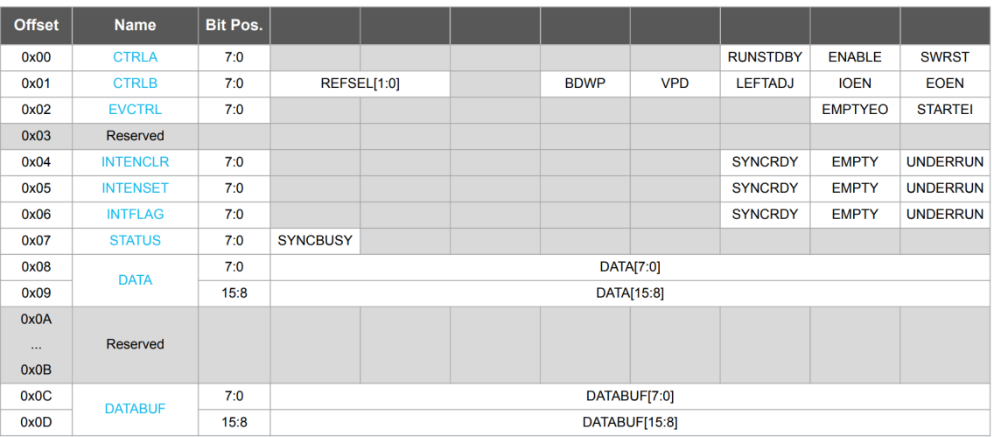 I will need to write/read 0x42004808 and 0x42004809.
There is a timer example which seems to work.
The device accepts 10-bit samples and I want to play notes from middle-C to C5. A4 is 440 Hz and I’d like to play at least 10 samples per wavelength (Nyquist’s theorem requires >2, the more the better but this is a cheap speaker anyway). That requires a sampling rate of about 5000 samples/second. Unfortunately, with only 32K of sram and 10-bit samples this will not fit in 32K data memory.
So there are a few options:
 SRAM still filled up. It turned out the PROGMEM Macro was blank. I ended up digging into the linker and doing by hand:
 seems to work. Be sure to use const so that the compiler knows it shouldn’t try to update the waveforms.
A little music theory is helpful here. The A440 note is 440 Hz. This is what you always hear at an orchestra right before the conductor comes out. It is the A4 key on your piano. C4 is the “middle C” key left of it. Each key on a piano, black or white, is twelfth-root-of-two (around 1.0595) times (moving to the right) or divided by (moving to the left) from the adjacent key’s frequency. Nearly all of the music you will hear is built from these notes. Twelve keys is an octave (the A below middle C is 220 Hz). You can build up frequency tables pretty easily from that information. I updated analogWriteResolution to 8 bits. Middle-C is 3 half-steps above A220, so 220*(1.0595)^3 = ~261.13, I’m sampling at 5000 samples/second, and my samples should go from 128 up to 255 then down to 0 and back up.
Happy Birthday (in public Domain now) is a pretty useful test song. The data structure is the note and the number of beats.

Here is the github and Video.
The hookup is pretty simple:
- Connect Xiao SAMD21 Pin1 (DAC/A0) to LM386 “In” Pin
- Connect Xiao SAMD21 (5V) to LM386 “VCC” pin
- Connect Xiao SAMD21 (GND) to LM386 “GND” pin (either)
- Connect LM386 “Out” pins (+/-) to Speaker(+/-)
- Connect USB cable to Xiao SAMD21 (USB)
A first-pass attempt to do this without interrupts or timers is not feasible:
float x = 0; // Value to take the sin of
float increment = 0.04; // Value to increment x by each time
void setup()
{
analogWriteResolution(10); // Set analog out resolution to max, 10-bits
Serial.begin(9600);
}
void loop()
{
// Generate a voltage value between 0 and 1023.
// Scale a sin wave between those values:
// Offset by 511.5, then multiply sin by 511.5.
int dacVoltage = (int)(511.5 + 511.5 * sin(x));
x += increment; // Increase value of x
// Generate a voltage between 0 and 3.3V.
// 0= 0V, 1023=3.3V, 512=1.65V, etc.
analogWrite(DAC_PIN, dacVoltage);
delay(1);
}
Computing sin(x) on the fly takes non-zero time, especially when loading a floating point library on what I presume is an integer processor. Obviously, I want my samples to be applied at exactly regular intervals. delay(1) will be delay(1ms)+time-it-takes-to-process. So I decided to pursue a timer and buffer-approach.
I was curious if I could write to the DAC register directly, rather than go through the Arduino library. Looking at the datasheet page 74:
I will need to write/read 0x42004808 and 0x42004809.
char myvalue[10];
int dacVoltage = 943;
analogWrite(DAC_PIN, dacVoltage);
Serial.println(dacVoltage,DEC);
unsigned char * p1 = (unsigned char *) 0x42004808;
unsigned char * p2 = (unsigned char *) 0x42004809;
short p = *p1 + (short) 256* (*p2);
sprintf(myvalue,"%u",p);
Serial.write(myvalue);
Serial.write("\n");
gives the expected values.
There is a timer example which seems to work.
The device accepts 10-bit samples and I want to play notes from middle-C to C5. A4 is 440 Hz and I’d like to play at least 10 samples per wavelength (Nyquist’s theorem requires >2, the more the better but this is a cheap speaker anyway). That requires a sampling rate of about 5000 samples/second. Unfortunately, with only 32K of sram and 10-bit samples this will not fit in 32K data memory.
So there are a few options:
- Dynamically compute the value of the sine wave. The issue here is that the computation will take time and the timer will not be able to keep up, especially since I will be doing floating point on an integer processor.
- Packing the bytes or dropping to 8-bits.
- Storing lookup tables in Program memory.
SRAM still filled up. It turned out the PROGMEM Macro was blank. I ended up digging into the linker and doing by hand:
seems to work. Be sure to use const so that the compiler knows it shouldn’t try to update the waveforms.
A little music theory is helpful here. The A440 note is 440 Hz. This is what you always hear at an orchestra right before the conductor comes out. It is the A4 key on your piano. C4 is the “middle C” key left of it. Each key on a piano, black or white, is twelfth-root-of-two (around 1.0595) times (moving to the right) or divided by (moving to the left) from the adjacent key’s frequency. Nearly all of the music you will hear is built from these notes. Twelve keys is an octave (the A below middle C is 220 Hz). You can build up frequency tables pretty easily from that information. I updated analogWriteResolution to 8 bits. Middle-C is 3 half-steps above A220, so 220*(1.0595)^3 = ~261.13, I’m sampling at 5000 samples/second, and my samples should go from 128 up to 255 then down to 0 and back up.
for i in range (fs):
128 + 127*sin(2*3.1415*i*ft/fs)
This will give me one-second worth of middle-C. fs is my sample frequency (5000) and ft is my desired tone frequency (261.3).
Happy Birthday (in public Domain now) is a pretty useful test song. The data structure is the note and the number of beats.
Here is the github and Video.